Razorpay
Razorpay is a leading payment gateway solution that allows businesses to accept, process, and manage online payments through various methods, including credit/debit cards, UPI, net banking, and digital wallets.
Why Connect Razorpay to Whatsdash?
Integrating your Razorpay financial data with Whatsdash transforms raw transaction logs into clear, real-time profitability and sales performance reports alongside your marketing and other business metrics.
-
Unified Financial Reporting: Consolidate payment data—including payments, refunds, and settlements—with your advertising spend and sales funnel metrics in one central dashboard.
-
Real-Time Revenue Insights: Gain immediate clarity on key Metrics like total revenue, transaction count, average payment value, and success rates to monitor financial health as it happens.
-
Transaction-Level Detail & Analysis: Go beyond high-level summaries by using powerful dimensions like Payment ID, Status, and Currency to filter and analyze specific transaction segments, understand failure reasons, and manage refunds effectively.
📋 Steps to Integrate your Razorpay Account to Whatsdash
✔️ Navigate to the 'Integrations' page using the Navigation bar.
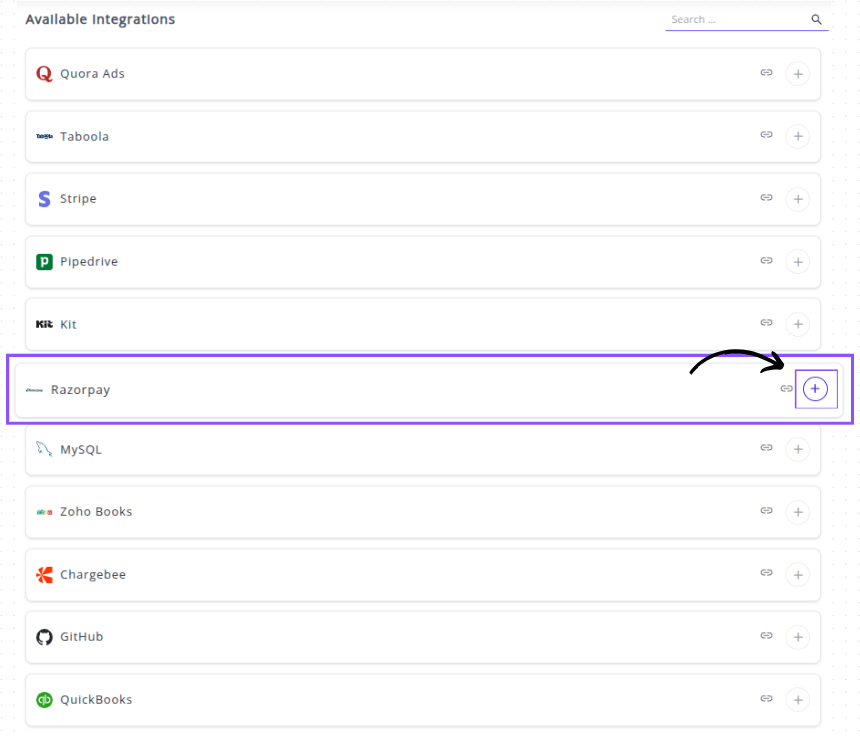
✔️ Select Razorpay from the Available Integrations.

✔️ Click the + button.
✔️ Enter Credentials into Whatsdash
After clicking the + button, a connection window will appear prompting you to enter the necessary parameters from your Razorpay account:
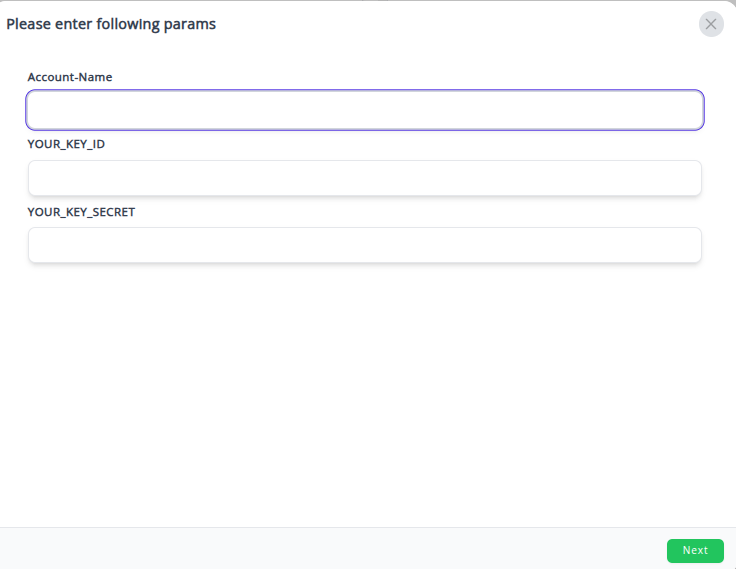
- Account-Name: Enter a descriptive name for this specific connection.
- YOUR_KEY_ID: Paste the Key ID you copied from your Razorpay Dashboard.
- YOUR_KEY_SECRET: Paste the Key Secret you copied and securely saved from your Razorpay Dashboard.
✔️ Your Razorpay integration will appear in the Connected Integrations list.
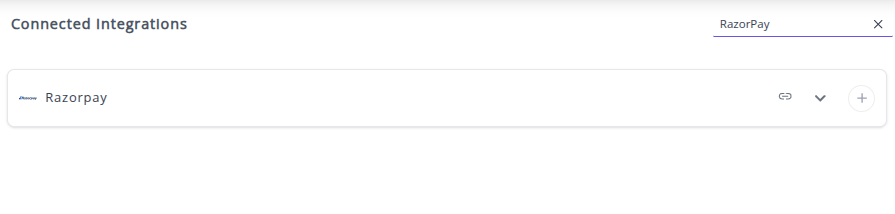
✔️ You can now create or customize dashboards using your Razorpay Metrics and Dimensions.
👉 How to visualize this data in your dashboard, visit the Dashboard Documentation Guide.
🔗 Razorpay Metrics
The table below lists the RazorPay Metrics available through the Whatsdash RazorPay Integration.
| Name | Category | Why it’s useful |
|---|---|---|
| Order Amount | Orders | Total order value, essential for revenue tracking and reporting. |
| Order Amount Paid | Orders | Amount successfully paid, helps track partial/full payments and cash flow. |
| Order Amount Due | Orders | Remaining balance to be paid, useful for monitoring pending payments. |
| Payment Amount | Payment | Total payment received, critical for financial reporting and reconciliation. |
| Payment Amount Refunded | Payment | Amount refunded, helps track customer refunds and adjustments. |
| Payment Fee | Payment | Transaction fees charged by Razorpay, essential for calculating net revenue. |
| Payment Tax | Payment | Tax portion of payment fee, important for accurate tax reporting. |
| Refund Amount | Refund | Total refunded to customer, useful for monitoring returns and financial impact. |
| Invoice Gross Amount | Invoice | Total invoice amount before discounts/taxes, useful for total billing overview. |
| Invoice Tax Amount | Invoice | Tax applied to the invoice, needed for tax reporting and compliance. |
| Invoice Taxable Amount | Invoice | Amount subject to tax, important for accounting and auditing. |
| Invoice Amount | Invoice | Total invoice value including taxes, helps track billing completeness. |
| Invoice Amount Paid | Invoice | Amount actually paid by customer, critical for payment reconciliation. |
| Invoice Amount Due | Invoice | Remaining invoice balance, helps manage collections. |
| Invoice Line Items Amount | Invoice | Amount charged for individual items, useful for itemized revenue reporting. |
| Invoice Line Items Unit Amount | Invoice | Unit price of items, necessary for pricing and margin analysis. |
| Invoice Line Items Gross Amount | Invoice | Total gross for line item, helps assess revenue before discounts/taxes. |
| Invoice Line Items Tax Amount | Invoice | Tax on individual line items, useful for granular tax reporting. |
| Invoice Line Items Taxable Amount | Invoice | Taxable portion of line items, helps in compliance and audits. |
| Invoice Line Items Net Amount | Invoice | Net amount after taxes/discounts, important for final revenue calculation. |
| Invoice Line Items Quantity | Invoice | Quantity of items sold, essential for inventory and sales tracking. |
🔗 Razorpay Dimensions
The table below lists the RazorPay Dimensions available through the Whatsdash RazorPay Integration.
| Name | Category | Why it’s useful |
|---|---|---|
| Order ID | Orders | Unique identifier for the order, essential for tracking and reconciliation. |
| Order Currency | Orders | Currency of the order, needed for multi-currency reporting and conversions. |
| Order Receipt | Orders | Merchant-defined receipt number for internal tracking or customer reference. |
| Order Status | Orders | Shows current order state, important for monitoring payment progression. |
| Payment Created At | Payment | Timestamp of payment initiation, useful for time-based analyses. |
| Payment ID | Payment | Unique payment identifier, critical for retrieving and tracking payments. |
| Payment Currency | Payment | Currency in which payment was made, useful for financial reporting. |
| Payment Status | Payment | Current payment state, helps track completed or failed transactions. |
| Payment Method | Payment | Method used for payment, valuable for analyzing payment trends. |
| Payment Description | Payment | Custom description provided for payment, useful for context or audit. |
| Payment Bank | Payment | Bank used by the customer, useful for tracking netbanking and banking analytics. |
| Payment Email | Payment | Customer email, essential for communication and customer identification. |
| Refund ID | Refund | Unique refund identifier, needed to track specific refund transactions. |
| Refund Currency | Refund | Currency in which the refund was processed, useful for reporting. |
| Refund Created At | Refund | Timestamp of refund initiation, important for financial tracking. |
| Refund Status | Refund | Current refund state, helps monitor completion or failures. |
| Invoice ID | Invoice | Unique identifier for invoices, essential for invoice management. |
| Invoice Receipt | Invoice | Receipt number of the invoice, used for tracking and customer reference. |
| Invoice Number | Invoice | Unique invoice number, important for accounting and reporting. |
| Invoice Customer ID | Invoice | Customer identifier linked to invoice, useful for customer-level analysis. |
| Invoice Customer Name | Invoice | Name of the invoice recipient, needed for identification and reporting. |
| Invoice Customer Email | Invoice | Email of invoice recipient, important for communication. |
| Invoice Customer City | Invoice | City of invoice recipient, useful for geographic reporting. |
| Invoice Customer Country | Invoice | Country of invoice recipient, useful for compliance and reporting. |
| Invoice Created At | Invoice | Timestamp when invoice was created, critical for time-based reporting. |
| Invoice Line Items ID | Invoice | Identifier for each line item, used for product-level tracking. |
| Invoice Line Items Name | Invoice | Name of billed product/service, important for itemized reporting. |
| Invoice Line Items Description | Invoice | Detailed description of items, helpful for audits and clarity. |
| Year | Time | Year (YYYY) for temporal grouping of transactions. |
| Year Of Week | Time | Year for a specific week, useful for weekly analysis. |
| Year Of Week(ISO) | Time | ISO year-week, useful for standardized weekly reporting. |
| Year Month | Time | Year and month (YYYYMM), useful for monthly aggregation. |
| Month | Time | Month (MM), helpful for monthly reporting and trends. |
| Year Week | Time | Year and week (YYYYWW), useful for weekly reporting. |
| Year Week(ISO) | Time | ISO year-week, standardized for cross-system comparison. |
| Week | Time | Week number, helpful for weekly trend analysis. |
| Week(ISO) | Time | ISO week number, useful for standard weekly metrics. |
| Day Of Month | Time | Day of the month, useful for daily reporting. |
| Day Of Week Name | Time | Name of the day, useful for weekday trend analysis. |
| Day Of Week Name(ISO) | Time | ISO weekday name, useful for standardized weekly analysis. |
| Date | Time | Full date (YYYYMMDD), essential for precise daily reporting. |
🔗 Explore More Integrations
Whatsdash supports a wide range of marketing, analytics, and eCommerce integrations to give you a holistic view of your business performance.
👉 Visit the Integrations Page to explore all available connections