GitHub
GitHub is the world's leading platform for software development, providing version control using Git and collaboration tools for millions of developers and teams.
Why Connect GitHub to Whatsdash?
Integrating your GitHub data with Whatsdash transforms raw development activity into clear, quantifiable insights, making it easy to track and report on engineering performance alongside business KPIs.
-
Track Development Velocity: Monitor core metrics like Cycle Time, Commit Frequency, and Pull Request (PR) throughput to identify bottlenecks and measure the efficiency of your engineering workflow.
-
Align Tech with Business: Blend development data (e.g., Issues Closed) with product, sales, and marketing metrics to clearly demonstrate the impact of the engineering team on overall business goals.
-
Simplify Reporting for Stakeholders: Present complex development statistics in accessible, visual dashboards that non-technical stakeholders can easily understand.
📋 Steps to Integrate your GitHub Account to Whatsdash
✔️ Navigate to the 'Integrations' page using the Navigation bar.
✔️ Select Github from the Available Integrations.
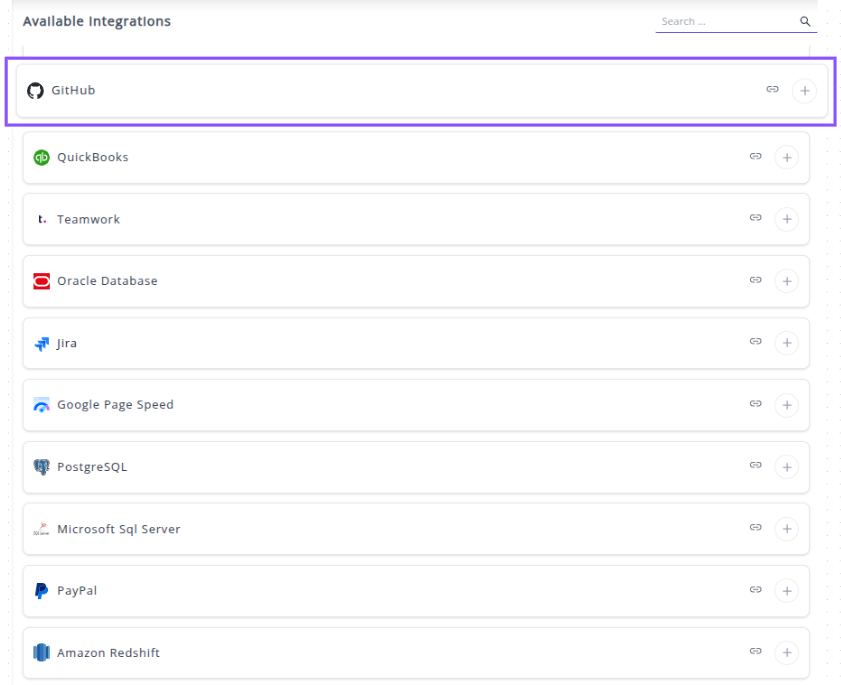
✔️ Click the + button.

✔️ You will be redirected to a GitHub sign-in page to authorize the connection.
✔️ Sign in to your GitHub account using your Username/Email and Password, or choose to "Continue with Google," "Continue with Apple," or "Sign in with a passkey."

✔️ Once signed in, GitHub will prompt you to Grant Whatsdash Access to your data. Review the requested read-only permissions and click Authorize Whatsdash (or a similar confirmation button).
✔️ Once authenticated and authorized, you will be redirected back to Whatsdash. Your GitHub Integration will now appear in the Connected Integrations list.

✔️ You can now create or customize dashboards using your GitHub Metrics and Dimensions.
👉 To visualize this data in your dashboard, visit the Dashboard Documentation Guide.
🔗 GitHub Metrics
The table below lists the Github Metrics available through the Whatsdash Github Integration.
| Name | Category | Why it’s useful |
|---|---|---|
| Issue Count | Issue | Tracks the total number of issues, useful for monitoring project workload. |
| Forks Count | Repo | Shows how many times the repository has been forked, indicating popularity and collaboration. |
| Watchers | Repo | Number of users watching the repo, useful for gauging interest in the project. |
| Branch Count | Branch | Total branches in the repository, helps track development activity and branch management. |
| Issue Comment Count | Issue | Number of comments on issues, useful for measuring team interaction and discussion. |
| Commit Comments Count | Commit | Tracks comments on commits, useful for reviewing code discussions. |
| Time since last Commit | Commit | Shows time elapsed since the last commit, helpful for monitoring activity and repo health. |
| Pull Requests Count | PR | Total pull requests, indicates development progress and contributions. |
| Pull Request Draft Count | PR | Tracks draft PRs, helping to identify work-in-progress contributions. |
| Collaborators | Collaborators | Number of collaborators, useful for understanding team size and engagement. |
| Issue Resolution Time | Issue | Measures time taken to close issues, important for project efficiency analysis. |
| Commit Count | Commit | Total commits, helps track codebase changes and developer activity. |
| Stars | Repo | Number of stars, a key metric for popularity and community interest. |
| Contributions | Contributor | Total contributions by a contributor, useful for performance tracking. |
| Sub Issues Count | Issue | Tracks sub-issues under main issues, helps manage complex tasks. |
| Issue Reactions | Issue | Number of reactions on issues, useful to gauge engagement and community feedback. |
| Verified Commit Count | Commit | Number of verified commits, important for security and authenticity verification. |
| Protected Branches | Branch | Number of protected branches, ensures critical branches are safeguarded. |
🔗 GitHub Dimensions
The table below lists the Github Dimensions available through the Whatsdash Github Integration.
| Name | Category | Why it’s useful |
|---|---|---|
| Contributor Name | Contributor | Identifies all contributors to a repository, useful for tracking contributions and collaboration. |
| Issue Title | Issue | Provides the title of issues for monitoring and managing project tasks. |
| Issue Created By | Issue | Shows who created an issue, helping track accountability and reporting. |
| Issue Closed By | Issue | Identifies who closed an issue, useful for workflow and performance analysis. |
| Issue Assignee Name | Issue | Shows who is responsible for an issue, helping with task assignment tracking. |
| Issue Creation Time | Issue | Timestamp for when the issue was created, useful for timeline analysis. |
| Issue State | Issue | Indicates the status of an issue (open/closed), key for workflow tracking. |
| Pull Request Name | PR | Provides the title of pull requests for tracking feature development or bug fixes. |
| Pull Request Created By | PR | Identifies who created a PR, useful for contributor performance and accountability. |
| Pull Request Creation Time | PR | Timestamp for PR creation, useful for project timeline analysis. |
| Pull Request Closing Time | PR | Time when the PR was closed, useful to track resolution speed. |
| Pull Request Merged At | PR | Shows merge time, important for release tracking and workflow analysis. |
| Pull Request Assignee | PR | Shows the assignee of a PR, helpful for responsibility tracking. |
| Pull Request Head Branch | PR | Identifies the source branch of the PR, useful for branch management. |
| Pull Request Base Branch | PR | Identifies the target branch for the PR, helping in release planning. |
| Committer Name | Commit | Tracks who committed changes, useful for accountability and contribution analysis. |
| Author Name | Commit | Shows the author of commits, important for tracking code contributions. |
| Committed Time | Commit | Timestamp of the commit, used for time-series analysis of development activity. |
| Commit Message | Commit | Contains commit notes, helpful for understanding changes and version history. |
| Branch Name | Branch | Lists repository branches, essential for branch management and workflow overview. |
| Year | Time | Helps group and analyze GitHub data by calendar year for trend analysis. |
| Year Of Week | Time | Useful for weekly trend analysis within a year. |
| Year Of Week(ISO) | Time | Provides ISO-standard weekly grouping for consistent reporting. |
| Year Month | Time | Aggregates data by year and month for monthly reporting. |
| Month | Time | Allows month-level analysis and seasonal pattern detection. |
| Year Week | Time | Tracks data weekly with year context for time-series insights. |
| Year Week(ISO) | Time | ISO-compliant weekly aggregation for standardized weekly reporting. |
| Week | Time | Enables week-level analysis across years for activity tracking. |
| Week(ISO) | Time | ISO-standard week grouping, helpful for cross-region consistency. |
| Day Of Month | Time | Analyzes activity or metrics by day within a month. |
| Day Of Week Name | Time | Identifies trends by weekdays, useful for workload or activity patterns. |
| Day Of Week Name(ISO) | Time | ISO-compliant weekday grouping, ensures consistency in reporting. |
| Date | Time | Provides precise daily granularity for detailed time-series analysis. |
🔗 Explore More Integrations
Whatsdash supports a wide range of marketing, analytics, and eCommerce integrations to give you a holistic view of your business performance.
👉 Visit the Integrations Page to explore all available connections