QuickBooks
QuickBooks is the industry-leading accounting software that Whatsdash integrates with to centralize your critical financial data—like sales, revenue, expenses, and cash flow—for robust, cross-functional business intelligence and reporting.
Why Connect QuickBooks Online to Whatsdash?
Integrating your QuickBooks Online data with Whatsdash transforms raw financial records into automated, visual, and easy-to-understand dashboards that are accessible to your entire team, not just the finance department.
-
Real-Time Financial Health: Get a current, holistic view of your key financial indicators—like Profit & Loss and Cash Flow—without having to manually run and export reports from QuickBooks.
-
Custom Financial KPIs: Go beyond standard P&L reports. Use Whatsdash's powerful customization features to track Custom Metrics and unique financial KPIs relevant to your specific business model.
-
Data Blending & Context: Combine financial metrics (from QuickBooks) with operational data (from your CRM, marketing, and sales tools) to understand the true ROI and cost-effectiveness of every part of your business.
📋 Steps to Integrate your QuickBooks Online account to Whatsdash
✔️ Navigate to the 'Integrations' page using the Navigation bar.
✔️ Select QuickBooks from the Available Integrations.
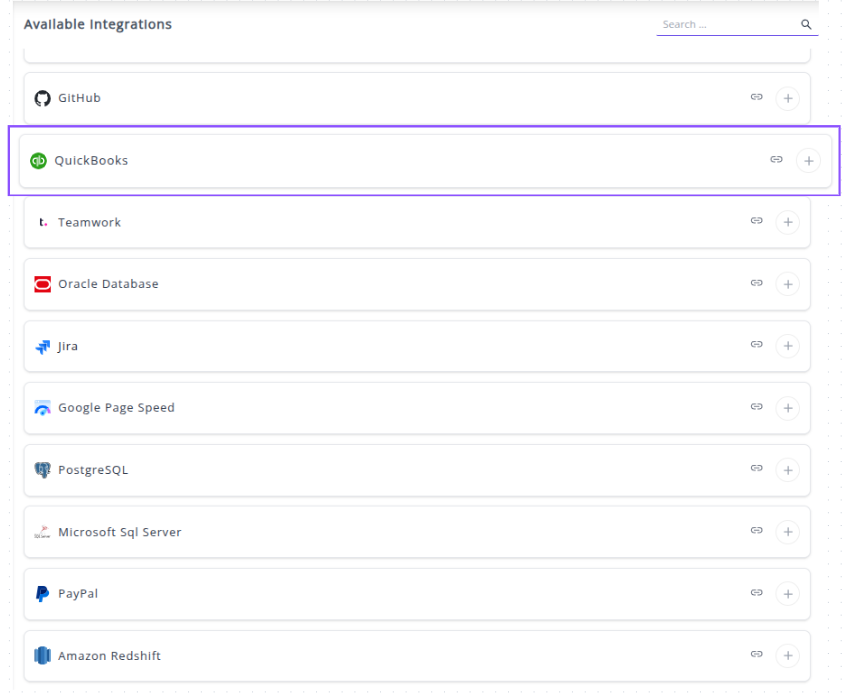
✔️ Click the + button.

✔️ You will be redirected to the Intuit(QuickBooks) sign-in page.

✔️ Sign in with the Intuit account credentials that have access to the QuickBooks Online company you want to report on.
✔️ Authorize the connection. You will be prompted to grant Whatsdash the necessary permissions to read your accounting data (e.g., invoices, customers, transactions). Review the permissions and click Connect or Authorize.
✔️ Once authenticated and authorized, you will be directed back to Whatsdash. Your QuickBooks Online Integration will appear in the Connected Integrations list.

✔️ You can now create or customize dashboards using your QuickBooks Metrics and Dimensions.
👉 For guidance on visualizing this data in your dashboard, visit the Dashboard Documentation Guide.
🔗 Quickbooks Metrics
The table below lists the Quickbooks Metrics available through the Whatsdash Quickbooks Integration.
| Name | Category | Why it’s useful |
|---|---|---|
| Open Invoices Amount | Invoices | Shows the total value of outstanding invoices not yet paid by customers. |
| Open Invoices | Invoices | Tracks unpaid customer invoices to monitor accounts receivable and cash flow. |
| Overdue Invoices Amount | Invoices | Displays the total amount of invoices past their due date, indicating delayed payments. |
| Overdue Invoices | Invoices | Helps identify overdue customer payments to take follow-up actions. |
| Paid Invoices Amount | Invoices | Measures total money received from paid invoices, showing actual revenue. |
| Total Expenses (Cash) | Bills | Tracks total cash expenses paid during a specific period for expense control. |
| Total Expenses (Accrual) | Bills | Captures total recorded expenses, including unpaid bills, for profitability analysis. |
| Unpaid Expenses (Bills) Amount | Bills | Shows total unpaid bills, helping manage liabilities and upcoming payments. |
| Unpaid Expenses (Bills) | Bills | Tracks vendor bills pending payment to manage cash flow efficiently. |
| Cost of Goods Sold (Cash) | Profit & Loss | Reflects direct cash costs for producing goods or services sold. |
| Cost of Goods Sold (Accrual) | Profit & Loss | Tracks all incurred production costs whether paid or not, showing true profitability. |
| Other Expenses (Cash) | Bills | Captures miscellaneous cash-based expenses not categorized elsewhere. |
| Other Expenses (Accrual) | Bills | Tracks accrued non-operating expenses like interest or taxes. |
| Other Income (Cash) | Profit & Loss | Measures non-core income sources such as rent or asset sales (cash basis). |
| Other Income (Accrual) | Profit & Loss | Tracks non-operating income recognized before payment is received. |
| Income (Cash) | Profit & Loss | Shows actual cash received from sales and other sources. |
| Income (Accrual) | Profit & Loss | Tracks total revenue earned, even if not yet collected. |
| Balance (Cash) | Balance Sheet | Displays current cash-based financial standing (assets vs liabilities). |
| Balance (Accrual) | Balance Sheet | Represents full financial position including accrued items. |
| Net Cash Increase | Balance Sheet | Shows change in available cash after inflows and outflows. |
| COGS (Cash) | Profit & Loss | Helps calculate cash-based profitability per product or service. |
| Expenses (Cash) | Profit & Loss | Tracks all cash-based spending to monitor operational efficiency. |
| Current Assets (Cash) | Balance Sheet | Reflects short-term assets that can quickly be converted to cash. |
| EBIT Growth (Accrual) | Profit & Loss | Measures change in earnings before interest and taxes under accrual basis. |
| EBIT (Accrual) | Profit & Loss | Shows operating profitability before interest and taxes (accrual). |
| Current Assets (Accrual) | Balance Sheet | Tracks short-term assets recorded under accrual accounting. |
| Net Other Income (Cash) | Profit & Loss | Shows total non-operating income after related expenses (cash basis). |
| Assets (Accrual) | Balance Sheet | Lists total owned resources used to generate income. |
| Gross Profit Growth (Cash) | Profit & Loss | Indicates improvement or decline in gross profit on cash basis. |
| Money Received | Profit & Loss | Measures total payments received from customers during a period. |
| Net Other Income (Accrual) | Profit & Loss | Tracks profit or loss from non-core activities under accrual accounting. |
| Net Income (Accrual) | Profit & Loss | Measures total profitability after all expenses on an accrual basis. |
| Paid Bills | Bills | Tracks total paid bills to monitor expenses and cash management. |
| EBIT Growth (Cash) | Profit & Loss | Shows change in EBIT (cash basis) across reporting periods. |
| Net Operating Income (Cash) | Profit & Loss | Shows operational profit after expenses and taxes but before interest. |
| Expenses (Accrual) | Profit & Loss | Captures total incurred expenses regardless of payment timing. |
| Current Liabilities (Cash) | Balance Sheet | Shows short-term financial obligations due within a year such as loans or payables. |
| Current Liabilities (Accrual) | Balance Sheet | Reflects short-term debts recorded under accrual accounting for financial accuracy. |
| Liabilities (Accrual) | Balance Sheet | Displays all obligations including long-term debts for a complete financial view. |
| Gross Profit Margin (Accrual) | Profit & Loss | Measures profitability percentage after deducting COGS from revenue under accrual basis. |
| Assets (Cash) | Balance Sheet | Tracks total resources owned by the business used for generating revenue. |
| Paid Invoices | Invoices | Indicates total revenue collected from paid customer invoices. |
| Net Income (Cash) | Profit & Loss | Shows total profit after cash expenses are deducted from revenue. |
| Net Operating Income (Accrual) | Profit & Loss | Reflects profitability from core operations on an accrual basis. |
| Gross Profit Margin (Cash) | Profit & Loss | Shows how efficiently a company turns cash sales into profit after direct costs. |
| Overdue Invoices by Due Date | Invoices | Helps track unpaid invoices that have crossed their due date for follow-up. |
| Gross Profit (Cash) | Profit & Loss | Reveals cash-based profit before deducting indirect costs and taxes. |
| Liabilities (Cash) | Balance Sheet | Lists total current and long-term obligations paid or due in cash. |
| Revenue Growth (Accrual) | Profit & Loss | Shows change in recorded revenue across periods under accrual accounting. |
| Paid Bills Amount | Bills | Tracks total expenses paid to vendors to manage cash outflow. |
| EBIT (Cash) | Profit & Loss | Measures earnings before interest and taxes based only on cash transactions. |
| Gross Profit (Accrual) | Profit & Loss | Calculates profit after COGS including all accrued revenue and expenses. |
🔗 Quickbooks Dimensions
The table below lists the Quickbooks Dimensions available through the Whatsdash Quickbooks Integration.
| Name | Category | Why it’s useful |
|---|---|---|
| Overdue Invoices Due Date | Invoices | Displays overdue invoices categorized by their due dates for better payment tracking. |
| Vendor ID | Bills | Identifies each vendor uniquely for reference in bills and payments. |
| Vendor City | Bills | Provides the city location of each vendor to help with regional expense analysis. |
| Vendor Country | Bills | Indicates the vendor’s country for global financial reporting. |
| Created Date | Bills | Tracks when each bill was created to monitor billing cycles. |
| Update Time | Bills | Records the latest modification time of a bill for version control and auditing. |
| Year | Time | Displays the year component (YYYY) for time-based financial analysis. |
| Year Of Week | Time | Shows the year corresponding to each week number for weekly reports. |
| Year Of Week(ISO) | Time | Displays ISO-compliant year and week combinations for standardized weekly reporting. |
| Year Month | Time | Combines year and month (e.g., 202501) for monthly trends and summaries. |
| Month | Time | Represents the month (01–12) to group data by month. |
| Year Week | Time | Displays year and week (e.g., 202545) to identify weekly performance. |
| Year Week(ISO) | Time | Provides ISO week numbering for consistent weekly reporting. |
| Week | Time | Indicates the week number (01–53) for time-series analysis. |
| Week(ISO) | Time | Uses ISO week format to standardize week-based data tracking. |
| Day Of Month | Time | Displays the specific day within a month (01–31) for granular daily data. |
| Day Of Week Name | Time | Shows the day name (e.g., Monday) to identify weekday-based performance. |
| Day Of Week Name(ISO) | Time | Lists ISO-compliant day names for standardized weekday grouping. |
| Date | Time | Represents complete date format (YYYYMMDD) for precise record-keeping. |
🔗 Explore More Integrations
Whatsdash supports a wide range of marketing, analytics, and eCommerce integrations to give you a holistic view of your business performance.
👉 Visit the Integrations Page to explore all available connections