Newsletter2Go
Newsletter2Go is a powerful email marketing platform that simplifies the creation, automation, and performance tracking of email campaigns, helping businesses connect with their audience effectively.
Why Connect Newsletter2Go to Whatsdash
Integrating your Newsletter2Go data into Whatsdash provides a centralized view of your campaign performance and consolidate email campaign Metrics with other marketing data for complete cross-channel performance analysis and reporting.,turning delivery statistics into actionable business insights.
-
Simplified Reporting & Dashboards: Get instant, visual reports on your email marketing performance using pre-built or custom templates without needing to log into the Newsletter2Go platform.
-
Cross-Channel Analysis: Blend granular email Metrics with sales, CRM, and ad spend data from other sources to understand the true ROI of your email efforts.
-
Audience & Campaign Insights: Track audience behavior, campaign effectiveness, and deliverability metrics side-by-side to quickly identify high-performing segments and content.
📋 Steps to Integrate your Newsletter2Go account to Whatsdash
✔️ Navigate to the 'Integrations' page using the Navigation bar.
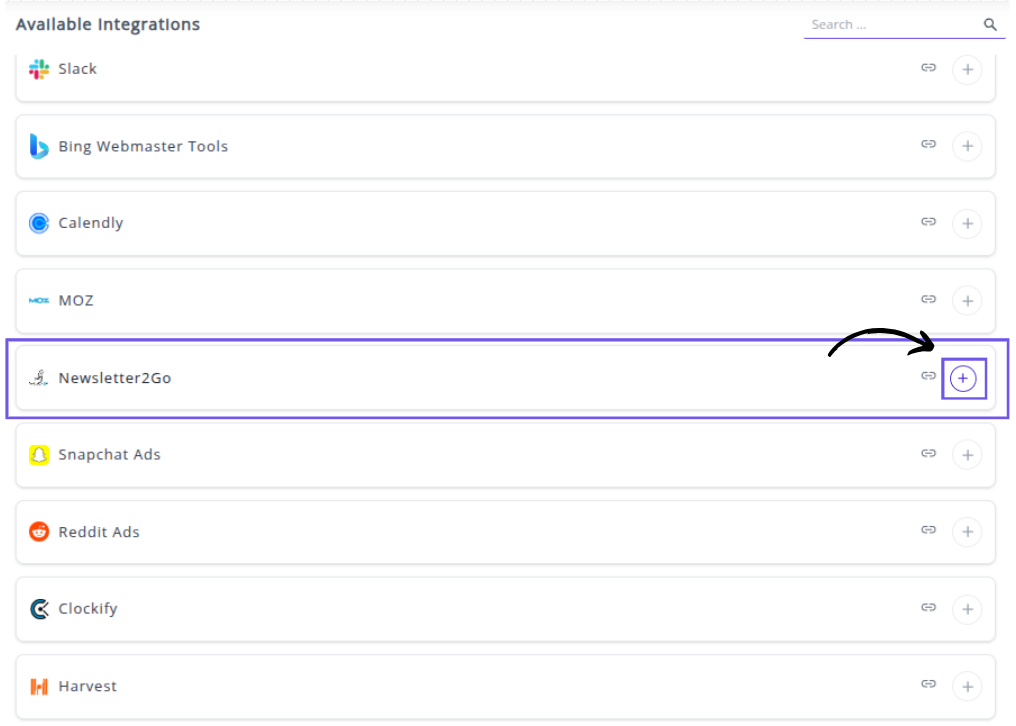
✔️ Select Newsletter2Go from the Available Integrations.

✔️ Click the + button to initiate the connection process.
A pop-up window titled "Please enter following params" will appear.
 ✔️ Fill in the following required fields exactly as shown in your image to complete the integration setup:
Username: Enter the email address associated with your Newsletter2Go account. This is usually your login email.
Password: Enter the password for your Newsletter2Go account.
Auth Key: Enter the API Key (Auth Key) retrieved from the API management section within your Newsletter2Go account settings.
✔️ Click Next to authenticate and save the integration.
✔️ Once authenticated, you will be directed back to Whatsdash. Your Newsletter2Go Integration will appear in the Connected Integrations list.
✔️ You can now create or customize dashboards using your Newsletter2Go Metrics and Dimensions.
👉 How to visualize this data in your dashboard, visit the Dashboard Documentation Guide
🔗 Newsletter2Go Metrics
The table below lists the Newsletter2Go Metrics available through the Whatsdash Newsletter2Go Integration.
| Name | Category | Why It’s Useful |
|---|---|---|
| Unsubscribes | Helps track users opting out, indicating email fatigue or poor targeting. | |
| Complaints | Measures the number of spam reports to maintain sender reputation. | |
| Bounces | Identifies failed deliveries, useful for cleaning invalid email addresses. | |
| Unique Open Rate | Shows how many unique users opened the email — gauges subject line effectiveness. | |
| Open Rate | Measures total email opens to assess engagement levels. | |
| Unique Opens | Tracks distinct recipients who viewed your email, avoiding duplicates. | |
| Opens | Reflects total opens, helping analyze repeated engagement. | |
| Opens Per Opener | Indicates how many times each user revisits your email. | |
| Unique Click Rate | Measures unique recipients who clicked — signals real engagement. | |
| Click Rate | Tracks all clicks, giving insight into link performance. | |
| CTR | Click-through rate helps measure overall engagement from opens to clicks. | |
| Unique Clicks | Shows how many unique users interacted with your email links. | |
| Click | Total link clicks across all recipients. | |
| Clicks Per Clicker | Indicates how many times a single user clicks, showing deep engagement. | |
| Unique Conversion Rate | Percentage of unique recipients completing desired actions. | |
| Conversion Rate | Overall effectiveness of your campaign in driving conversions. | |
| Unique Conversions | Number of distinct users who converted — useful for attribution analysis. | |
| Conversions | Total conversions achieved through the campaign. | |
| Conversions Per Recipient | Evaluates conversion efficiency relative to audience size. | |
| Amount | Total revenue generated from the campaign — measures ROI. | |
| Amount Per Conversion | Average value of each conversion, useful for pricing strategy. | |
| Receivers | Total number of contacts who received the email — helps gauge deliverability. |
🔗 Newsletter2Go Dimensions
The table below lists the Newsletter2Go Dimensions available through the Whatsdash Newsletter2Go Integration.
| Name | Category | Why It’s Useful |
|---|---|---|
| Campaign Name | Helps identify and organize performance data across multiple campaigns. | |
| Campaign Subject | Useful for analyzing how subject lines impact open and engagement rates. | |
| List Name | Enables segmentation and tracking of performance by audience lists. |
🔗 Explore More Integrations
Whatsdash supports a wide range of marketing, analytics, and eCommerce integrations to give you a holistic view of your business performance.
👉 Visit the Integrations Page to explore all available connections