SalesForce
Salesforce is the world's leading Customer Relationship Management (CRM) platform, helping companies manage and track all customer interactions, sales pipelines, and service activities. It provides a central hub for sales, service, marketing, and commerce data.
Connecting Salesforce to Whatsdash lets you quickly and easily review your sales pipeline health, service ticket status, and marketing-qualified lead (MQL) conversion rates as they move from initial contact to closed-won opportunities.
Why Connect Salesforce to Whatsdash?
Integrating your Salesforce data with Whatsdash transforms complex CRM information into clear, executive-ready reports, making critical sales and service metrics accessible to everyone.
-
Pipeline & Forecasting : Visualize the Sales Pipeline by Stage, monitor Weighted Pipeline Value, and track Time to Close to accurately forecast revenue and identify bottlenecks.
-
High-Level Performance : Consolidate top-line Metrics like Converted Revenue, Number of New Leads, and Customer Conversion Rate alongside financial and marketing data.
-
Lead-to-Opportunity Analysis : Blend Salesforce Lead and Opportunity data with GA4 or ad platform metrics to calculate the true Cost Per Acquisition (CPA) and measure the ROI of marketing campaigns.
-
Service Metrics : Monitor key service data like Average Case Resolution Time and Case Volume by Status/Priority to optimize service team efficiency and customer satisfaction.
📋 Steps to Integrate your Salesforce account to Whatsdash
✔️ Navigate to the 'Integrations' page using the Navigation bar.
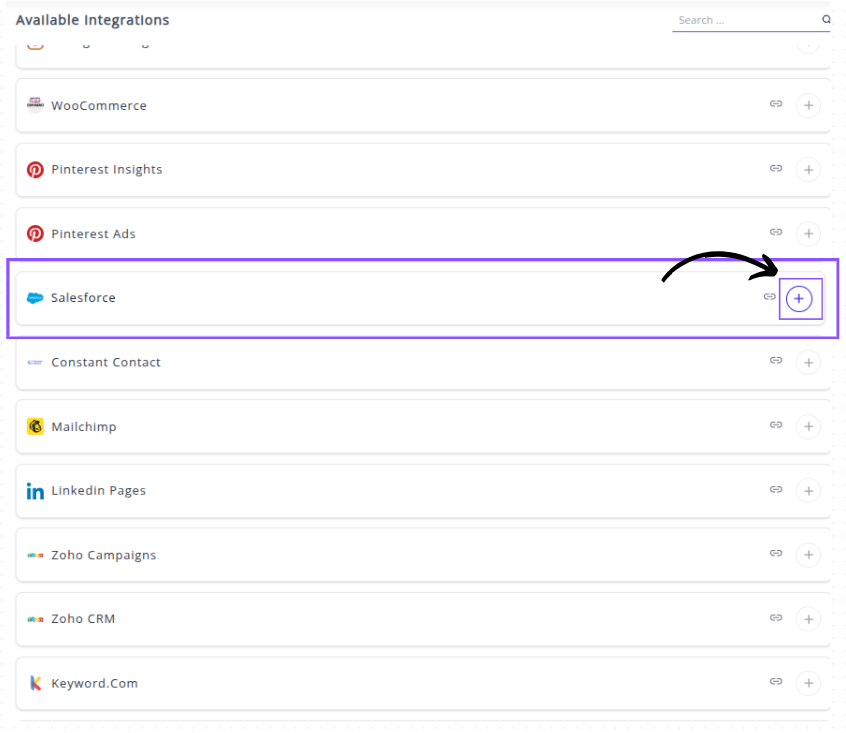
✔️ Select Salesforce from the Available Integrations.

✔️ Click the + button to open the Salesforce authorization window.
✔️ You will be redirected to the Salesforce Instance URL screen .Provide your SalesForce Instance URL to connect your SalesForce Account with Whatsdash.

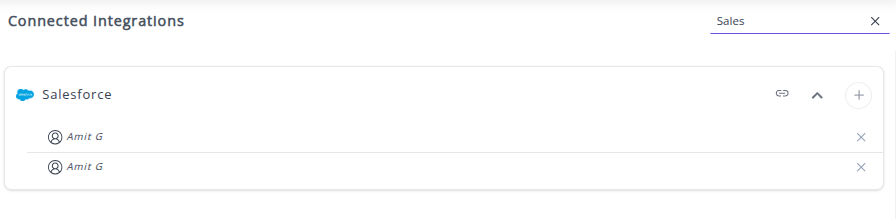
✔️ Once authenticated successfully, you will be directed back to Whatsdash. Your Salesforce Integration will appear in the Connected Integrations list with connected accounts.
✔️ You can now create or customize dashboards using your Salesforce Metrics and Dimensions.
👉 How to visualize this data in your dashboard, visit the Dashboard Documentation Guide
🔗 SalesForce Metrics
The table below lists key Salesforce Metrics integrated into Whatsdash.
| Name | Category | Why it’s useful |
|---|---|---|
| Leads | Lead | Tracks potential customers who have shown interest in your products or services. |
| Converted Leads | Lead | Helps measure how many leads successfully turn into qualified customers or opportunities. |
| New Customer | Opportunity | Identifies recently acquired customers to assess new business growth. |
| Opportunity | Opportunity | Represents potential sales or deals, helping track revenue opportunities in the pipeline. |
| Amount | Opportunity | Monitors the potential or actual revenue associated with each sales deal. |
| Amount Won | Opportunity | Shows the total revenue earned from successfully closed deals (Closed Won). |
| Amount Lost | Opportunity | Indicates revenue lost from deals that were not successfully closed. |
| Expected Revenue | Opportunity | Projects potential income from opportunities, helping forecast revenue. |
| Expected Revenue | Campaign | Estimates potential revenue impact of marketing campaigns. |
| Win Rate | Opportunity | Measures the percentage of deals won versus total opportunities to assess sales effectiveness. |
| Actual Cost | Campaign | Tracks actual spending on marketing campaigns for budget control. |
| Budgeted Cost | Campaign | Records planned spending, enabling comparison against actual expenses. |
| Campaign | Campaign | Tracks and manages overall marketing initiatives and performance. |
| Amount All Opportunities | Campaign | Summarizes total potential revenue from all opportunities linked to a campaign. |
| Num Sent | Campaign | Monitors the total number of people included in a campaign’s target audience. |
| Contact | Contact | Stores details about individual or business contacts for relationship management. |
| Won Opportunities | Opportunity | Reflects the number of deals successfully closed, indicating sales success. |
| Conversion Rate | Other | Shows the efficiency of converting leads into opportunities using the formula: (Opportunities ÷ Leads) × 100. |
| Converted Revenue | Opportunity | Displays total revenue generated from successfully converted opportunities (Closed Won). |
🔗 SalesForce Dimensions
The table below lists key Salesforce Dimensions integrated into Whatsdash.
| Name | Category | Why it’s useful |
|---|---|---|
| Status | Other | Indicates the current condition or progress of a record, useful for tracking workflow or deal stages. |
| Name | Other | Serves as a standard identifier across objects, enabling consistent referencing of records. |
| Rating | Other | Helps assess the quality or strength of a relationship with an account, aiding in prioritization. |
| Type | Other | Defines the object category or customization level, helping organize records by purpose or usage. |
| Stage | Other | Represents a phase in the sales or business process, useful for tracking deal progress. |
| Country | Other | Provides geographic segmentation to analyze performance or customers by region. |
| Industry | Other | Classifies businesses by industry type, enabling targeted marketing and reporting. |
🔗 Explore More Integrations
Whatsdash supports a wide range of marketing, analytics, and eCommerce integrations to give you a holistic view of your business performance.
👉 Visit the Integrations Page to explore all available connections