🧾 'Is Blank' and 'Is Not Blank' Filters
⚪ Is Blank Filter
The Is Blank filter condition in Reports is used to find records where a specific field is empty or has no value.
Example:
Your store lists multiple apparel products from brands like NIKE, Adidas, Puma, and Zara.
If you want to identify products missing a brand name, apply the Is Blank filter to the Brand field.
This will show only those products where the Brand field is empty — for example, items that were added to your store without assigning a brand.
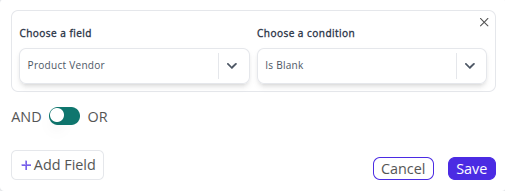
💡 The Is Blank filter is ideal for identifying incomplete product data, such as missing brand, SKU, or vendor details — helping you maintain data accuracy in your reports.
⚫ Is Not Blank Filter
The Is Not Blank filter condition in Reports is used to find records where a specific field has data filled in.
Example:
Continuing with the same store, if you want to view only products that have a brand assigned, apply the Is Not Blank filter to the Brand field.
The report will now show only products with a valid brand name, such as NIKE Air Zoom Pegasus, Adidas Ultraboost, and Puma Classic Hoodie — effectively excluding any unbranded items.
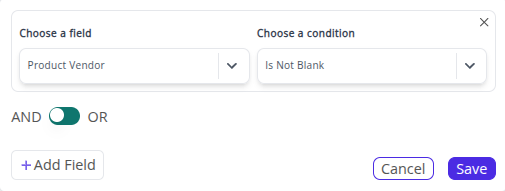
💡 The Is Not Blank filter ensures your analytics focus on complete, usable data — perfect for reports that rely on product, customer, or vendor information.
➡️ Next Filter: 🏁 Begins With & Not Begins With Filters